Physically Based Rendering (PBR) has become the industry standard for achieving realistic visuals in modern game development. Moving beyond traditional lighting models, PBR simulates how light interacts with surfaces in a physically accurate way, leading to more consistent and believable results across diverse lighting conditions.
For game developers and environment artists, mastering PBR isn't just about understanding the theory; it's about translating that knowledge into practical, engine-ready materials that perform efficiently and look stunning. This guide will walk you through the core principles, essential map types, workflow considerations, and optimization techniques to craft high-quality PBR assets for your games.
The Core Principles of Physically Based Rendering
At its heart, PBR is about simulating the physics of light. Unlike older rendering techniques that relied on artistic approximations, PBR uses real-world material properties to determine how light is reflected and absorbed. This approach ensures that your assets react consistently to light, regardless of the environment or lighting setup.
Two fundamental principles underpin PBR: energy conservation and microfacet theory. Energy conservation dictates that a surface cannot reflect more light than it receives. If a surface reflects a lot of light (specular), it must absorb less (diffuse), and vice-versa. Microfacet theory explains how microscopic surface details, too small to model directly, scatter light, influencing a material's roughness and reflectivity.
Metallic vs. Specular-Glossiness Workflows
While the underlying physics remains constant, PBR typically manifests in two primary workflows: Metallic-Roughness and Specular-Glossiness. The Metallic-Roughness workflow, often favored for its intuitive nature and fewer texture maps, uses a Metallic map to define whether a surface is a metal or a dielectric (non-metal) and a Roughness map to describe surface smoothness. The Specular-Glossiness workflow, while still valid, requires more maps and can be less intuitive for new artists.
Essential PBR Maps and Their Purpose
Creating compelling PBR materials relies on a set of texture maps, each conveying specific physical properties to the rendering engine. Understanding what each map represents is crucial for accurate material authoring.
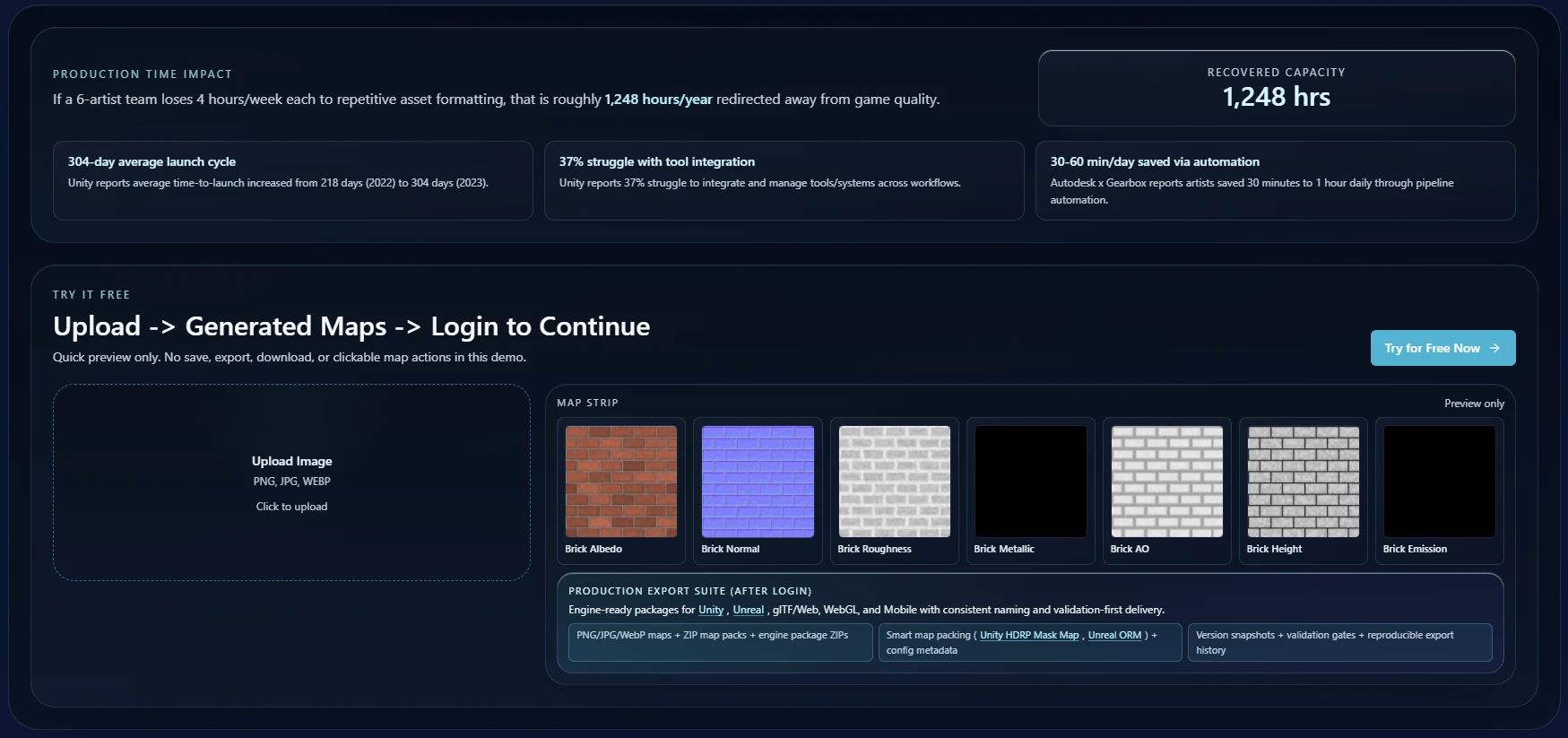
- Albedo (Base Color): This map defines the color of a surface when lit by pure white light, without any shading information. For non-metals, it represents the diffuse color. For metals, it represents the color of the reflected light (the metal's tint).
- Normal Map: A Normal map uses RGB values to store surface normal directions, faking high-detail geometry on a low-polygon model. This dramatically enhances visual fidelity without increasing polygon count.
- Roughness Map: This grayscale map (often represented as a black-to-white gradient) dictates how rough or smooth a surface is. Black typically means perfectly smooth (mirror-like reflection), while white means maximum roughness (diffuse reflection).
- Metallic Map: Another grayscale map, the Metallic map distinguishes between metallic (white, value 1) and dielectric (black, value 0) surfaces. Values between 0 and 1 can represent semi-metals or dirt on a metallic surface.
- Ambient Occlusion (AO) Map: AO simulates soft shadows where ambient light is occluded, such as crevices or corners. It adds depth and realism to materials.
- Height/Displacement Map: These maps store height information, which can be used for parallax occlusion mapping or actual tessellation to displace geometry, adding real depth.
Streamlining Your PBR Material Workflow
An efficient workflow is key to producing high-quality PBR materials consistently. This typically involves several stages, from initial concept to final engine integration.
From High-Poly to Game-Ready Low-Poly
Many PBR workflows begin with creating a high-polygon model that captures all the intricate details. This high-poly mesh is then used to bake essential maps (Normal, AO, Curvature, etc.) onto a much lower-polygon, game-ready mesh. This process transfers detail efficiently, allowing for complex visuals without heavy performance costs.
Texture Authoring and Generation
Once base maps are baked, the next step is authoring the PBR textures. This can involve painting in tools like Substance Painter, using procedural generators, or leveraging AI-powered solutions. Tools like PLAYTEX offer deterministic PBR map generation, allowing artists to quickly generate full sets of PBR textures from a single input, ensuring consistency and saving significant time.
"Modern PBR tools aren't just about making things look good; they're about making the creation process faster, more consistent, and inherently production-ready."
Consider using a consistent naming convention for your texture sets (e.g., asset_name_Albedo.png) and organizing them logically. This makes integration into game engines much smoother.
Achieving Consistency Across Assets
One of PBR's greatest strengths is its ability to produce consistent results, but this requires careful attention to calibration and material values. Inconsistent PBR values across different assets can lead to an unnatural look, breaking immersion.
Calibrating Values and Color Spaces
Ensure your PBR values (especially Roughness and Metallic) are within realistic ranges. Reference real-world materials and use physically accurate values. For example, pure metals should have a Metallic value of 1 and a dark Albedo (reflecting their color through specular). Dielectrics should have a Metallic value of 0 and a brighter Albedo.
Color space management is also critical. Albedo maps should typically be in sRGB, while data maps like Normal, Roughness, and Metallic should be linear (non-sRGB). Incorrect color space interpretation can lead to washed-out or overly saturated textures.
Building a Material Library
For larger projects, establishing a shared material library is invaluable. This library can contain pre-calibrated base materials, smart materials, or even full texture sets that adhere to project-specific PBR guidelines. This promotes visual consistency across the entire game and accelerates asset creation for new team members. PLAYTEX's asset binding features can help manage and share these standardized material libraries.
Optimizing Materials for Real-time Engines
Beautiful materials are only effective if they perform well within the constraints of a real-time game engine. Optimization is an ongoing process that balances visual fidelity with performance.
Texture Packing and Resolution
To reduce draw calls and memory usage, consider packing multiple grayscale PBR maps into a single RGB texture. For instance, you might pack Roughness into the Red channel, Metallic into the Green, and Ambient Occlusion into the Blue. This is a common practice that significantly optimizes texture sampling.
Choose appropriate texture resolutions. Not every asset needs 4K textures. Prioritize high-resolution textures for hero assets and visible surfaces, using lower resolutions for background elements or less prominent objects. AI texture generation tools can often help scale textures efficiently without losing quality.
Shader Complexity and Instancing
Keep your shaders as lean as possible. Avoid unnecessary calculations or complex nodes that aren't contributing significantly to the visual outcome. Many engines support material instancing, allowing you to create variations of a base material without duplicating the entire shader, further saving performance.
Leveraging Modern Tools for Efficiency
The landscape of game development tools is constantly evolving, with new solutions emerging to simplify and accelerate PBR workflows. Platforms like PLAYTEX are designed to empower creators with advanced capabilities.
PLAYTEX offers features like image-to-texture conversion, allowing you to quickly transform photographs or concept art into production-ready PBR materials. Its focus on deterministic generation and engine-ready outputs means less time spent on manual adjustments and more time on creative iteration. By integrating these tools, teams can maintain a faster content pipeline and ensure high-quality, consistent assets.
Common PBR Pitfalls and How to Avoid Them
Even with a solid understanding, certain mistakes can undermine the quality of your PBR materials.
- Incorrect Albedo Values: Avoid making Albedo maps too dark or too bright. Pure black (0,0,0) or pure white (255,255,255) are rarely found in nature for diffuse surfaces.
- Energy Conservation Violations: Ensure that your materials don't reflect more light than they receive. A highly metallic surface should have a very dark Albedo, as its color comes from reflections, not diffuse light.
- Tiling Artifacts: Repetitive patterns in seamless textures can be very noticeable. Use procedural generation, noise, or clever texture blending to break up obvious tiling.
- Ignoring Ambient Occlusion: While not strictly a PBR map, AO adds crucial depth and realism, grounding objects within their environment.
- Inconsistent Roughness: Roughness values should be carefully considered. A slightly rough surface will scatter light differently than a highly polished one. Avoid using uniform roughness across an entire object unless it's truly a single, homogeneous material.
Conclusion
Mastering PBR is an ongoing journey that combines artistic skill with technical understanding. By adhering to the core principles of physically based rendering, understanding the purpose of each texture map, adopting efficient workflows, and leveraging modern tools like PLAYTEX, you can consistently create stunning, engine-ready materials that elevate the visual quality of your games.
Focus on realism, consistency, and optimization, and your PBR assets will shine in any modern game engine. Ready to accelerate your material creation? Explore PLAYTEX's powerful PBR generation features today.